Use Gmail to Generate Unlimited E-mail Addresses:
Gmail has an interesting quirk where you can add a plus sign (+) after your Gmail address, and it'll still get to your inbox. It's called plus-addressing, and it essentially gives you an unlimited number of e-mail addresses to play with. Here's how it works: say your address is pinkyrocks@gmail.com, and you want to automatically label all work e-mails. Add a plus sign and a phrase to make it pinkyrocks+work@gmail.com and set up a filter to label it work (to access your filters go to Settings->Filters and create a filter for messages addressed to pinkyrocks+work@gmail.com. Then add the label work).
More real world examples:
Find out who is spamming you: Be sure to use plus-addressing for every form you fill out online and give each site a different plus address.
Example: You could use
pinkyrocks+nytimes@gmail.com for nytimes.com
pinkyrocks+freestuff@gmail.com for freestuff.com
Then you can tell which site has given your e-mail address to spammers, and automatically send them to the trash.
Automatically label your incoming mail: I've talked about that above.
Archive your mail: If you receive periodic updates about your bank account balance or are subscribed to a lot of mailing lists that you don't check often, then you can send that sort of mail to the archives and bypass your Inbox.
Example: For the mailing list, you could give pinkyrocks+mailinglist1@gmail.com as your address, and assign a filter that will archive mail to that address automatically. Then you can just check in once in a while on the archive if you want to catch up.
-unknown source
egrp is offline Reply With Quote
Wednesday, August 22, 2007

Tuesday, July 17, 2007
Forward yahoo emails to gmail
This is pretty slick for those of us who don't want to pay for yahoo plus and don't want to keep checking yahoo mail. it's not perfect, as only the first few lines are forwarded, but it is free! this trick also works for yahoo mail BETA
update to step 4.) you may need to click this
http://sites.mobile.yahoo.com/s/devregalerts?op=add&.done=%2Fs%2Fselectdev to be brought to the mobile page. Yahoo has added Yahoo GO or something like that which does not allow an SMS sent to an email address.
[B][SIZE="4"]instructions to forward yahoo mail to gmail (or other email) account:[/SIZE][/B]
1.) [url]http://mail.yahoo.com[/url] (sign in)
2.) click [B]Options[/B] link at top right
3.) click [B]Filters[/B] link
4.) see update above.... click link that says [B]Register your device[/B] in the mobile device setup
5.) device type: select "Pager/Other"
6.) set limit if you want
7.) hit [B]continue[/B] button
8.) for pager email address, type in your gmail (or any other) email address. i.e. [email]slickdeals@gmail.com[/email]. You DO NOT need to enter a pager carrier or phone number.
9.) hit [B]continue[/B] button
10.) in another window, sign in to gmail (or other email program). copy the confirmation code and paste into yahoo window. hit the [b]continue to step 4[/b] button and then the [b]done[/b] button. all the emails that are forwarded are from [email]y-alerts@reply.yahoo.com[/email]. you can use that address to set up a gmail filter for easier sorting of messages
11.) after hitting done, select the device for mail alerts. hit [b]save[/b] button. hit the [b]continue[/b] button, which brings you to the filter site at yahoo mail.
12.) hit the [b]add[/b] button to set up filter. in the field for [b]To/cc[/b] type your yahoo email address. this will select all emails that are sent to that address and go to inbox (not those that go to bulk folder). I might suggest moving forwarded emails to a 'new folder' so that they aren't in your inbox after being forwarded. you can [I]also[/I] make new filters if you don't want all emails going to gmail. [B]update for spam:[/B] at the header of each email in yahoo you can click the link that says "alert mobile device" this way you can receive ONLY those emails forwarded. if you don't want ALL you're yahoo mail forwarded to gmail, then you may have to create filters for emails FROM @yahoo.com @gmail.com @hotmail.com (etc) or if you want emails from Dell you to be forwarded you can include FROM @dell.com. anyway, to exclude spam from being forwarded, you will need something more selective than emails TO [email]myname@yahoo.com[/email]
currently I don't think this works if you were BCC'ed instead of TO or CC.
select option that says [b]move message to inbox[/b] in the field below, and MAKE SURE to [b]send an alert to my mobile device[/b]. Click the "add filter" button.
lucky 13.) send an email to your yahoo mail and check with gmail. for short messages you can read the whole thing. for longer messages you can click the link to read the message in basic html.
====================================
for similar instructions for [b]hotmail[/b] (not hotmail live), thanks ajskhan
thanks to rayrayz for mentioning this:
or you can add dots to your address to see who is spamming you, see [URL="http://mail.google.com/support/bin/answer.py?ctx=%67mail&hl=en&answer=10313"]here[/URL] (thanks and)
and thanks to RogieRog for mentioning YPOPS (which works but requires download)[/QUOTE]
update to step 4.) you may need to click this
http://sites.mobile.yahoo.com/s/devregalerts?op=add&.done=%2Fs%2Fselectdev to be brought to the mobile page. Yahoo has added Yahoo GO or something like that which does not allow an SMS sent to an email address.
[B][SIZE="4"]instructions to forward yahoo mail to gmail (or other email) account:[/SIZE][/B]
1.) [url]http://mail.yahoo.com[/url] (sign in)
2.) click [B]Options[/B] link at top right
3.) click [B]Filters[/B] link
4.) see update above.... click link that says [B]Register your device[/B] in the mobile device setup
5.) device type: select "Pager/Other"
6.) set limit if you want
7.) hit [B]continue[/B] button
8.) for pager email address, type in your gmail (or any other) email address. i.e. [email]slickdeals@gmail.com[/email]. You DO NOT need to enter a pager carrier or phone number.
9.) hit [B]continue[/B] button
10.) in another window, sign in to gmail (or other email program). copy the confirmation code and paste into yahoo window. hit the [b]continue to step 4[/b] button and then the [b]done[/b] button. all the emails that are forwarded are from [email]y-alerts@reply.yahoo.com[/email]. you can use that address to set up a gmail filter for easier sorting of messages
11.) after hitting done, select the device for mail alerts. hit [b]save[/b] button. hit the [b]continue[/b] button, which brings you to the filter site at yahoo mail.
12.) hit the [b]add[/b] button to set up filter. in the field for [b]To/cc[/b] type your yahoo email address. this will select all emails that are sent to that address and go to inbox (not those that go to bulk folder). I might suggest moving forwarded emails to a 'new folder' so that they aren't in your inbox after being forwarded. you can [I]also[/I] make new filters if you don't want all emails going to gmail. [B]update for spam:[/B] at the header of each email in yahoo you can click the link that says "alert mobile device" this way you can receive ONLY those emails forwarded. if you don't want ALL you're yahoo mail forwarded to gmail, then you may have to create filters for emails FROM @yahoo.com @gmail.com @hotmail.com (etc) or if you want emails from Dell you to be forwarded you can include FROM @dell.com. anyway, to exclude spam from being forwarded, you will need something more selective than emails TO [email]myname@yahoo.com[/email]
currently I don't think this works if you were BCC'ed instead of TO or CC.
select option that says [b]move message to inbox[/b] in the field below, and MAKE SURE to [b]send an alert to my mobile device[/b]. Click the "add filter" button.
lucky 13.) send an email to your yahoo mail and check with gmail. for short messages you can read the whole thing. for longer messages you can click the link to read the message in basic html.
====================================
for similar instructions for [b]hotmail[/b] (not hotmail live), thanks ajskhan
thanks to rayrayz for mentioning this:
or you can add dots to your address to see who is spamming you, see [URL="http://mail.google.com/support/bin/answer.py?ctx=%67mail&hl=en&answer=10313"]here[/URL] (thanks and)
and thanks to RogieRog for mentioning YPOPS (which works but requires download)[/QUOTE]
Sunday, June 17, 2007
Take YouTube With You Everywhere
After launching mobile services with both Verizon Wireless and Vodafone back in November 2006 and February this year respectively, YouTube has now launched a mobile version of its website accessible to any mobile handset user on any carrier.
The new mobile version of the site, accessed by browsing to http://m.youtube.com with a mobile phone web browser, provides a selection of videos from the Featured, Recently Added, Most Viewed, Top Rated, Top Favorites, Entertainment, and People categories. The interface also allows access to a 'Grab Bag' of random videos.
Videos are provided in the 3GP format, which is playable on the vast majority of mobile handsets produced in recent years. The site does warn that the videos are data intensive, and an unlimited data plan is recommended. [via Engadget Mobile]
http://www.mobileburn.com/news.jsp?Id=3461&source=HOME
The new mobile version of the site, accessed by browsing to http://m.youtube.com with a mobile phone web browser, provides a selection of videos from the Featured, Recently Added, Most Viewed, Top Rated, Top Favorites, Entertainment, and People categories. The interface also allows access to a 'Grab Bag' of random videos.
Videos are provided in the 3GP format, which is playable on the vast majority of mobile handsets produced in recent years. The site does warn that the videos are data intensive, and an unlimited data plan is recommended. [via Engadget Mobile]
http://www.mobileburn.com/news.jsp?Id=3461&source=HOME
Friday, June 8, 2007
This is cool! Pandora on winamp hack
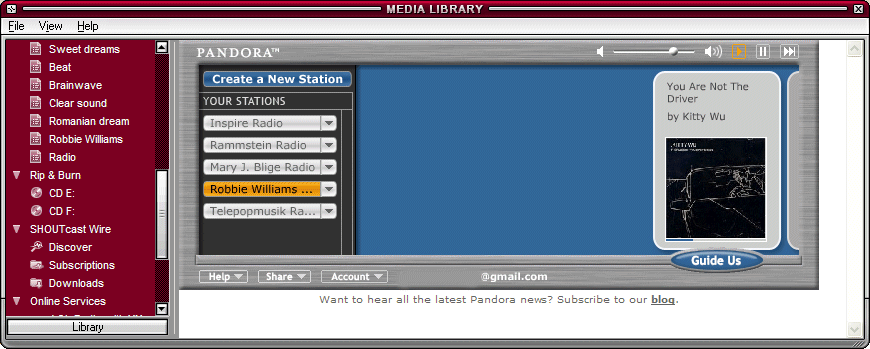
Listen To Pandora In Winamp
If you have the latest version of Winamp (namely, Winamp 5.32), you can add Pandora, a great online personalized radio, to Media Library so you can listen to the music without opening Pandora in a browser.
Close Winamp, then open this file in Notepad:
C:\Program Files\Winamp\Plugins\ml\ml_online.ini
(change the location if you've installed Winamp elsewhere).
Replace this line
ElementID11=-1
with
ElementID11=11000
ElementIcon11=11007
ElementSubbed11=1
ElementName11=Pandora
ElementURL11=http://www.pandora.com?cmd=mini
ElementID12=-1
In fact, you should find the last line that contains ElementID[number]=-1, replace it with the code above, where instead of 11 you write [number].
Save the file, then right-click on it in Explorer, select Properties and check "Read-only" in the Attributes section.
When you open Winamp again, go to Media Library/Online Services/Pandora. If you don't have a Pandora account, you should make one. You can close Media Library and still listen to the radio.
Thursday, June 7, 2007


Subscribe to:
Comments (Atom)


