After launching mobile services with both Verizon Wireless and Vodafone back in November 2006 and February this year respectively, YouTube has now launched a mobile version of its website accessible to any mobile handset user on any carrier.
The new mobile version of the site, accessed by browsing to http://m.youtube.com with a mobile phone web browser, provides a selection of videos from the Featured, Recently Added, Most Viewed, Top Rated, Top Favorites, Entertainment, and People categories. The interface also allows access to a 'Grab Bag' of random videos.
Videos are provided in the 3GP format, which is playable on the vast majority of mobile handsets produced in recent years. The site does warn that the videos are data intensive, and an unlimited data plan is recommended. [via Engadget Mobile]
http://www.mobileburn.com/news.jsp?Id=3461&source=HOME
Sunday, June 17, 2007

Friday, June 8, 2007
This is cool! Pandora on winamp hack
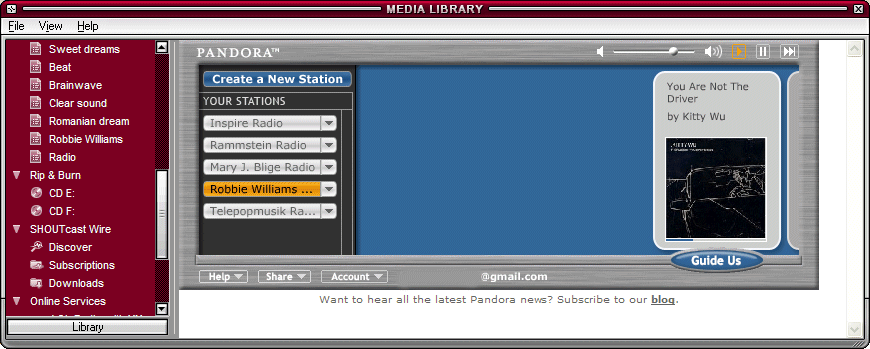
Listen To Pandora In Winamp
If you have the latest version of Winamp (namely, Winamp 5.32), you can add Pandora, a great online personalized radio, to Media Library so you can listen to the music without opening Pandora in a browser.
Close Winamp, then open this file in Notepad:
C:\Program Files\Winamp\Plugins\ml\ml_online.ini
(change the location if you've installed Winamp elsewhere).
Replace this line
ElementID11=-1
with
ElementID11=11000
ElementIcon11=11007
ElementSubbed11=1
ElementName11=Pandora
ElementURL11=http://www.pandora.com?cmd=mini
ElementID12=-1
In fact, you should find the last line that contains ElementID[number]=-1, replace it with the code above, where instead of 11 you write [number].
Save the file, then right-click on it in Explorer, select Properties and check "Read-only" in the Attributes section.
When you open Winamp again, go to Media Library/Online Services/Pandora. If you don't have a Pandora account, you should make one. You can close Media Library and still listen to the radio.
Thursday, June 7, 2007


Subscribe to:
Comments (Atom)


